Train ML models in Teradata using In-Database Analytic Functions
Overview
There are situations where you want to quickly validate a machine learning model idea. You may have a model type in mind, but you may not want to operationalize it with an ML pipeline yet. You just want to test whether the relationship you have in mind exists. In some cases, even a production deployment may not require constant retraining with MLOps.
In such cases, you can use In-Database Analytic Functions for feature engineering, training different ML models, scoring models, and evaluating model performance.
Prerequisites
You need access to a Teradata instance.
If you need a test instance of Teradata, you can provision one for free at https://www.teradata.com/try
Load the sample data
In this example, we use sample data from the val database. We use the accounts, customer, and transactions tables. Since we will create tables during this process, and you might face issues creating tables directly in the val database, let's create our own database, td_analytics_functions_demo.
You must have CREATE TABLE permissions on the database where you want to use In-Database Analytic Functions.
Let's now create the accounts, customer, and transactions tables in our td_analytics_functions_demo database from the corresponding tables in the val database.
If you are using DBeaver, run each CREATE TABLE statement separately or ensure Auto-commit is enabled. Running multiple DDL statements together may result in the following error: Only an ET or null statement is legal after a DDL Statement.
Understand the sample data
Now that we have our sample tables loaded into td_analytics_functions_demo, let's explore the data.
This is a simple, fictitious banking dataset with approximately 700 customer records, 1,400 account records, and 77,000 transaction records. The tables are related to each other as shown below:
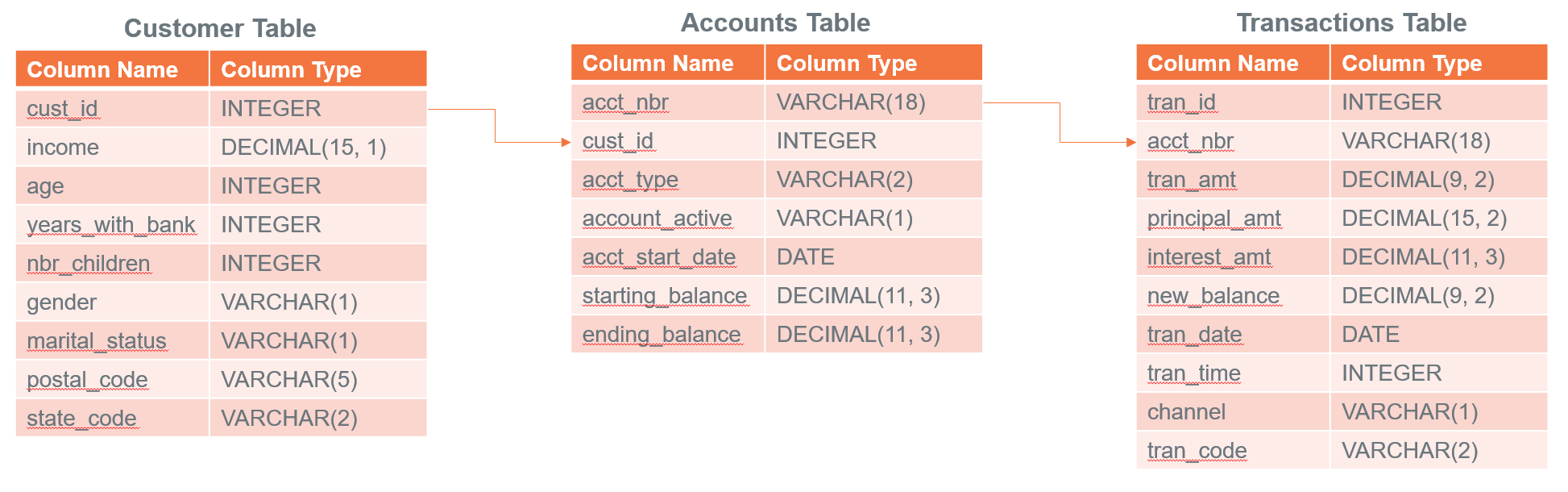
In the next steps, we will explore whether we can build a model that predicts a banking customer's average monthly credit card balance based on non-credit-card-related variables from the tables.
Prepare the dataset
We have data in three tables that we want to join and use to create features. Let's start by creating a joined table.
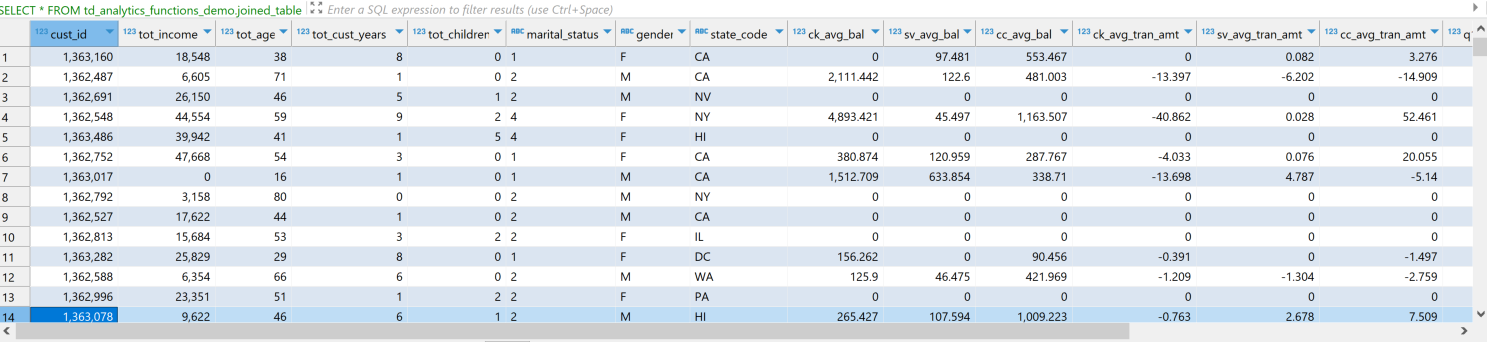
Let's now see how our data looks.
The dataset has both categorical and continuous features, or independent variables. In our case, the dependent variable is cc_avg_bal, which is the customer's average credit card balance.
Feature engineering
After looking at the data, we can see that there are several features we can use to predict cc_avg_bal.
TD_OneHotEncodingFit
Our dataset includes categorical features such as gender, marital_status, and state_code. We will use the In-Database Analytic Function TD_OneHotEncodingFit to encode these categories into one-hot numeric vectors.
TD_ScaleFit
Some columns, such as tot_income, ck_avg_bal, and transaction count columns, have values in different ranges. For optimization algorithms like gradient descent, it is important to normalize values to the same scale for faster convergence, scale consistency, and improved model performance.
We will use the TD_ScaleFit function to normalize values across different scales.
TD_ColumnTransformer
Teradata In-Database Analytic Functions typically operate in pairs for data transformations. The first function fits the data and generates the required parameters. The second function uses those parameters to transform the input data. The TD_ColumnTransformer function takes the fit tables as input and transforms the input table columns in a single operation.
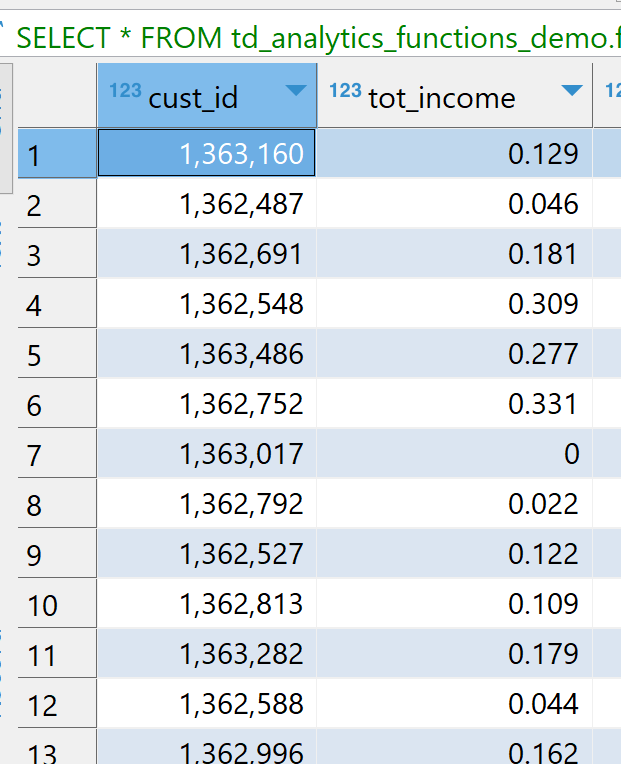
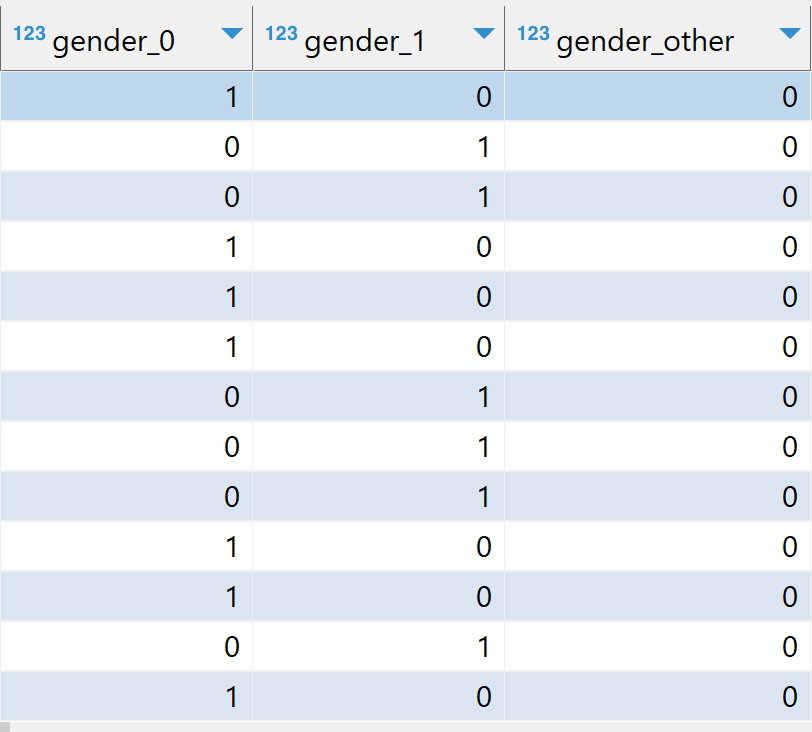
After we perform the transformation, we can see that the categorical columns are one-hot encoded and the numeric values are scaled, as shown in the images below. For example, tot_income is in the range [0, 1], and gender is one-hot encoded into gender_0, gender_1, and gender_other.
Train/test split
Now that our dataset is ready with scaled and encoded features, let's split it into training and testing datasets. We will use 75% of the data for training and 25% for testing.
Teradata In-Database Analytic Functions provide the TD_TrainTestSplit function, which we will use to split our dataset.
As shown below, the function adds a new column, TD_IsTrainRow, where 1 indicates a training row and 0 indicates a testing row.
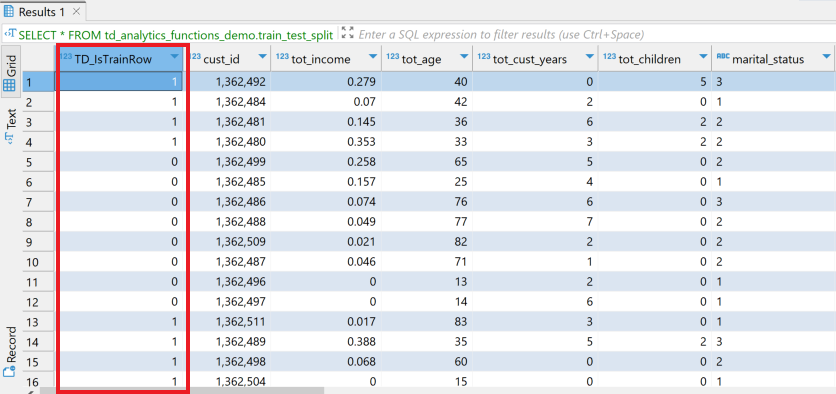
We will use TD_IsTrainRow to create two tables: one for training and one for testing.
Training with generalized linear model
We will now use the TD_GLM In-Database Analytic Function to train our model on the training dataset. The TD_GLM function is a generalized linear model (GLM) that performs regression and classification analysis on datasets.
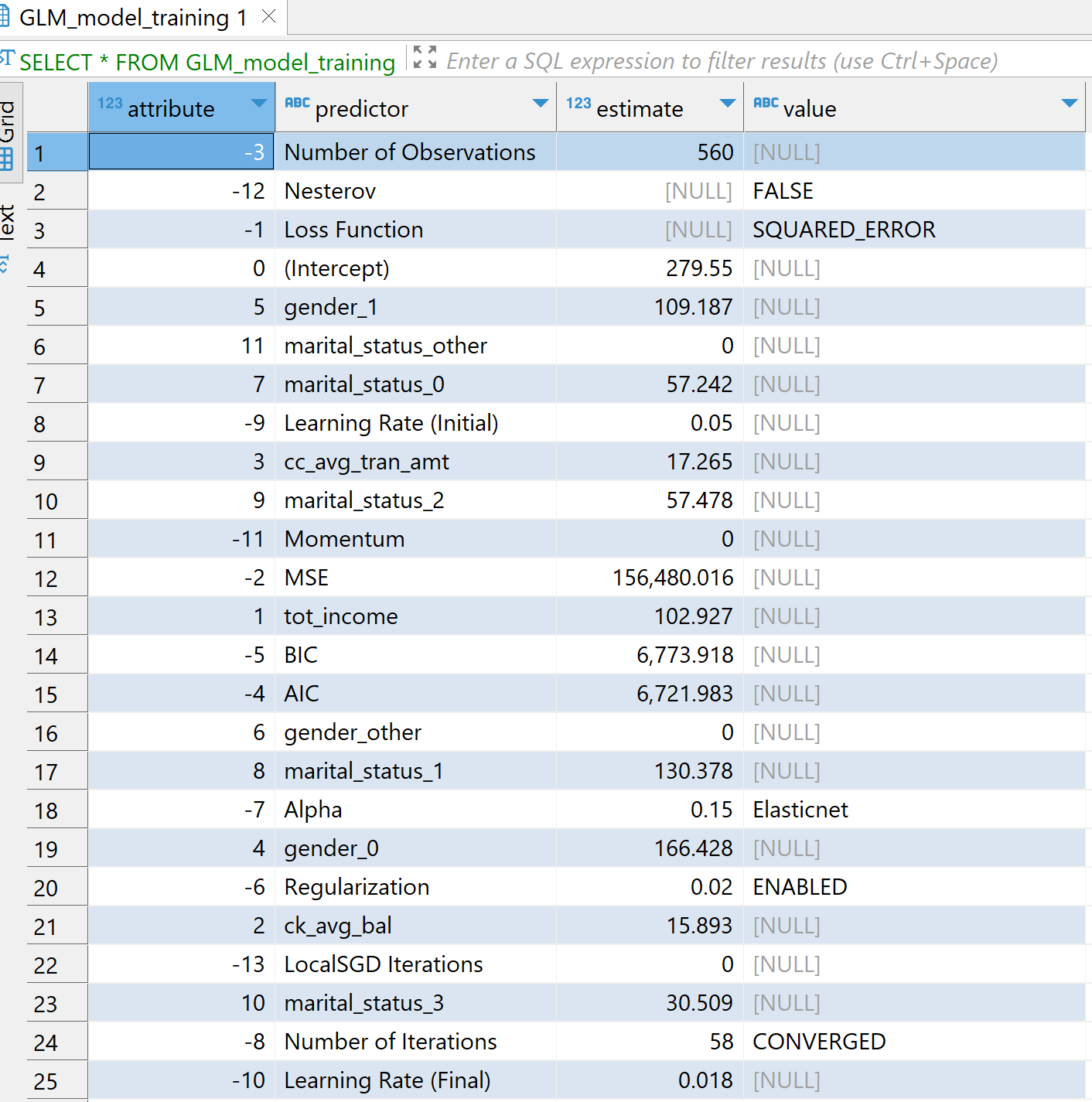
In this example, we use input columns such as tot_income, ck_avg_bal, cc_avg_tran_amt, and one-hot encoded values for marital status, gender, and state. The dependent, or response, column is cc_avg_bal. Since cc_avg_bal is a continuous value, this is a regression problem. We use Family as Gaussian for regression and Binomial for classification.
The Tolerance parameter specifies the minimum improvement required in prediction accuracy for the model to continue iterating, while MaxIterNum specifies the maximum number of iterations allowed. Training stops when either condition is met first. In the example below, the model reaches CONVERGED status after 58 iterations.
Scoring on testing dataset
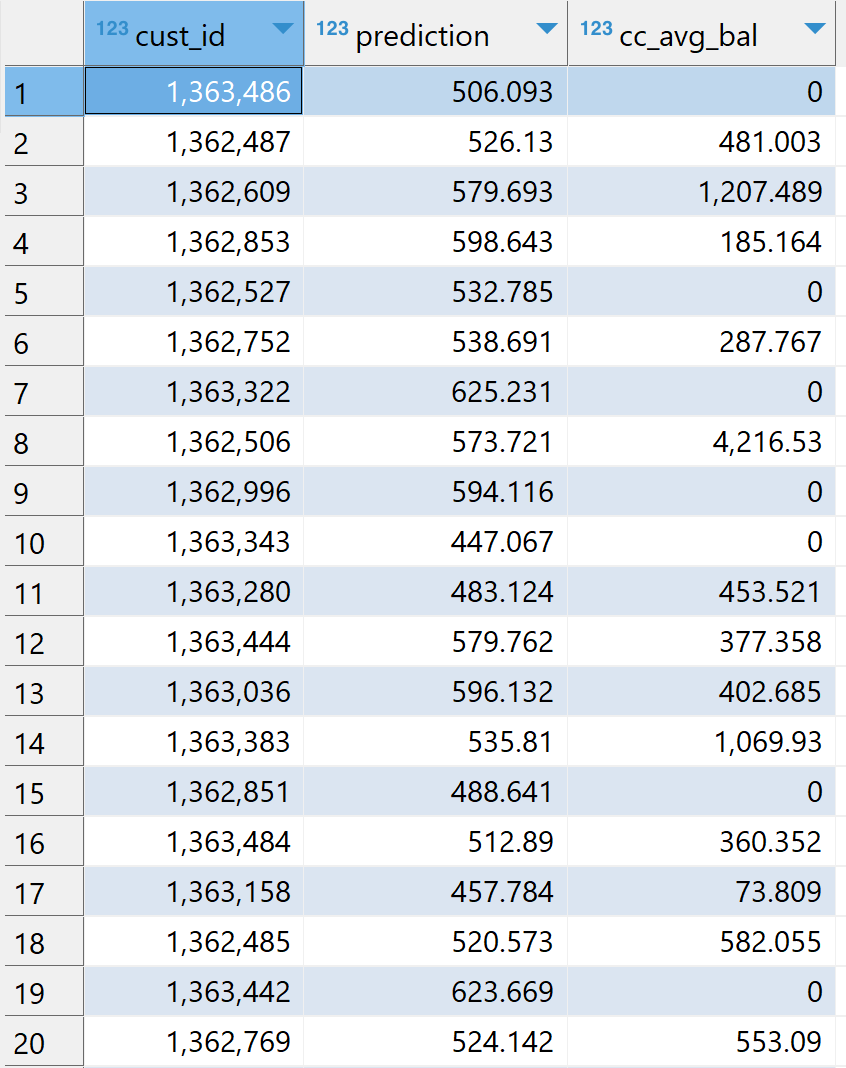
We will now use our model, GLM_model_training, to score the testing dataset, testing_table, using the TD_GLMPredict In-Database Analytic Function.
Model evaluation
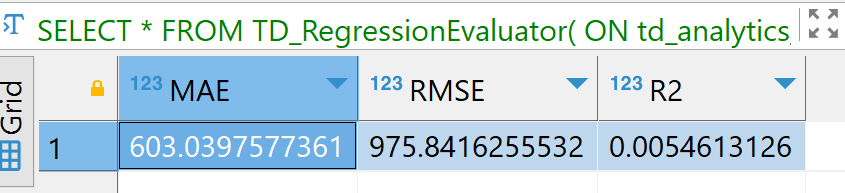
Finally, we evaluate our model on the scored results. We will use the TD_RegressionEvaluator function for model evaluation. The model can be evaluated using metrics such as RMSE, MAE, and R2.
The purpose of this how-to is not to describe feature engineering in detail, but to demonstrate how we can use different In-Database Analytic Functions in Teradata. The model results might not be optimal, and the process of building the best model is beyond the scope of this article.
Summary
In this quickstart, we learned how to create ML models using Teradata In-Database Analytic Functions. We created our own database, td_analytics_functions_demo, and loaded the customer, accounts, and transactions data from the val database.
We performed feature engineering using TD_OneHotEncodingFit, TD_ScaleFit, and TD_ColumnTransformer. We then used TD_TrainTestSplit to split the dataset into training and testing tables. Next, we trained a model using TD_GLM, scored the testing dataset using TD_GLMPredict, and evaluated the scored results using TD_RegressionEvaluator.