Advanced dbt use cases with Teradata
Overview
This project showcases the integration of dbt with Teradata from an advanced user perspective. If you are new to data engineering with dbt we recommend that you start with our introductory project.
The advanced use cases showcased in the demo are the following:
- Incremental materializations
- Utility macros
- Optimizing table/view creations with Teradata-specific modifiers
The application of these concepts is illustrated through the ELT process of teddy_retailers, a fictional store.
Prerequisites
-
Access to a Teradata instance.
NoteIf you need a test instance of Teradata, you can provision one for free at https://www.teradata.com/try
-
Python 3.9, 3.10, 3.11, 3.12 or 3.13 installed.
-
uv installed for Python environment and package management.
-
A database client for running database commands, we recommend Teradata SQL Extension for Visual Studio Code.
Demo project setup
-
Clone the tutorial repository and cd into the project directory:
-
Create a new Python virtual environment and install dbt and its dependencies:
-
Install the project's dependencies
dbt-utilsandteradata-utils. This can be done through the following command:
Data setup
The demo project assumes that the source data is already loaded into your Teradata instance, this mimics the way that dbt is used in a production environment. To achieve this objective we provide public datasets available in Google Cloud Platform (GCP), and scripts to load those datasets in Teradata.
-
Create or select a working database. The dbt profile in the project points to a database called
teddy_retailers. You can change theschemavalue to point to an existing database in your Teradata system or you can create theteddy_retailersdatabase running the following script in your database client: -
Load initial data set. Run the scripts in the
references/inserts/folder of the project in your database client, in this order:create_db.sql— creates theteddy_retailersdatabase and thenos_authauthorization object needed for GCS access.create_data.sql— loads the four source tables from Google Cloud Storage using Teradata NOS.
Each table should load in under 10 seconds. Expected row counts:
source_products(50),source_customers(1,000),source_orders(858),source_order_products(9,131).
Configure dbt
We will now configure dbt to connect to Teradata.
Create the file $HOME/.dbt/profiles.yml with the following content. Adjust <host>, <user>, <password> to match your Teradata credentials.
If you have already used dbt before in your environment you only need to add a profile for the project in your home's directory .dbt/profiles.yml file.
If the directory .dbt doesn't exist in your system yet you will need to create it and add the profiles.yml to manage your dbt profiles.
Now, that we have the profile file in place, we can validate the setup:
If the debug command returned errors, you likely have an issue with the content of profiles.yml.
About the Teddy Retailers warehouse
As mentioned, teddy_retailers is a fictional store.
Through dbt driven transformations we transform source data ingested from theteddy_retailers transactional database into a star schema ready for analytics.
The data models
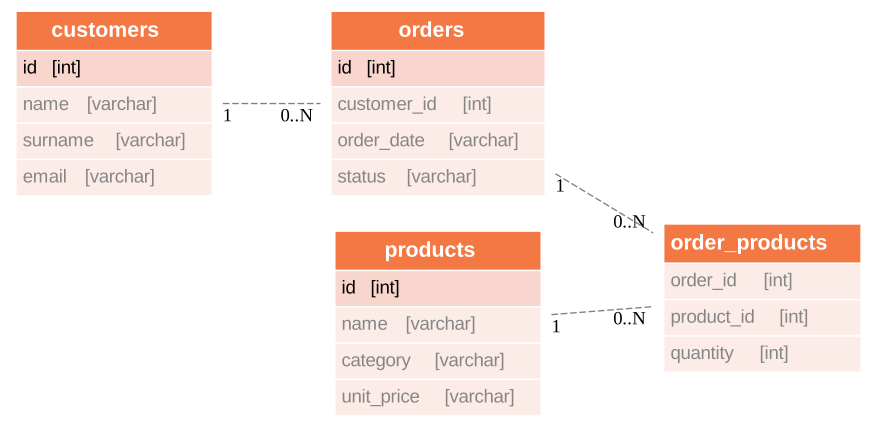
The source data consists of the following tables customers, orders, products, and order_products, according to the following Entity Relations Diagram:
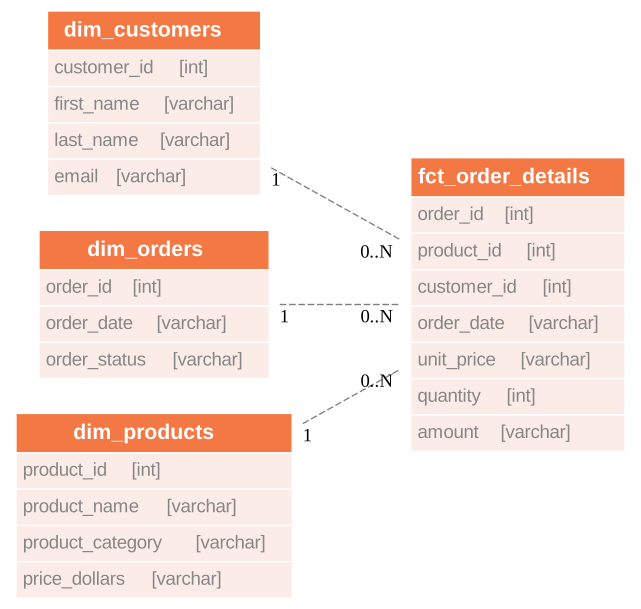
Using dbt, we leverage the source data tables to construct the following dimensional model, which is optimized for analytics tools.
The sources
- For Teddy Retailers, the
ordersandorder_productssources are periodically updated by the organization's ELT (Extract, Load, Transform) process. - The updated data only includes the latest changes rather than the entire dataset due to its large volume.
- To address this challenge, it is necessary to capture these incremental updates while preserving the previously available data.
The dbt models
The schema.yml file in the project's models directory specifies the sources for our models. These sources align with the data we loaded from GCP using our SQL scripts.
Staging area
The staging area models are merely ingesting the data from each of the sources and renaming each field, if appropiate. In the schema.yml of this directory we define basic integrity checks for the primary keys.
Core area
The following advanced dbt concepts are applied in the models at this stage:
Incremental materializations
The schema.yml file in this directory specifies that the materializations of the two models we are building are incremental.
We employ different strategies for these models:
- For the
all_orders model, we utilize the delete+insert strategy. This strategy is implemented because there may be changes in the status of an order that are included in the data updates. - For the
all_order_productsmodel, we employ the default append strategy. This approach is chosen because the same combination oforder_idandproduct_idmay appear multiple times in the sources. This indicates that a new quantity of the same product has been added or removed from a specific order.
Macro assisted assertions
Within the all_order_products model, we have included an assertion with the help of a macro to test and guarantee that the resulting model encompasses a unique combination of order_id and product_id. This combination denotes the latest quantity of products of a specific type per order.
Teradata modifiers
For both the all_order and all_order_products models, we have incorporated Teradata modifiers to enhance tracking of these two core models.
To facilitate collecting statistics, we have added a post_hook that instructs the database connector accordingly. Additionally, we have created an index on the order_id column within the all_orders table.
Running transformations
Create dimensional model with baseline data
By executing dbt, we generate the dimensional model using the baseline data.
This will create both our core and dimensional models using the baseline data.
Test the data
We can run our defined test by executing:
Running sample queries
The references/query path contains the following sample business intelligence queries:
consult_customers.sql— customer dimension analysisconsult_orders.sql— order facts analysisconsult_products.sql— product dimension analysisget_stats.sql— statistical summaries
Run these queries in your database client after uv run dbt run has completed successfully and the target tables exist.
Mocking the ELT process
The scripts for loading updates into the source data set can be found in the references/inserts/update_data.sql path of the project. Execute it in your database client after completing the steps above.
After updating the data sources, you can proceed with the aforementioned steps: running dbt, testing the data, and executing sample queries. This will allow you to visualize the variations and incremental updates in the data.
Summary
In this tutorial, we explored the utilization of advanced dbt concepts with Teradata+. The sample project showcased the transformation of source data into a dimensional data mart. Throughout the project, we implemented several advanced dbt concepts, including incremental materializations, utility macros, and Teradata modifiers.