dbt with Teradata
Overview
This tutorial demonstrates how to use dbt (data build tool) with Teradata. It's based on the original dbt Jaffle Shop tutorial. A couple of models have been adjusted to the SQL dialect supported by Teradata.
Prerequisites
-
Access to a Teradata instance.
NoteIf you need a test instance of Teradata, you can provision one for free at https://www.teradata.com/try
-
Python 3.10, 3.11, 3.12, or 3.13 installed.
-
uv installed for Python environment and package management.
Install dbt
-
Clone the tutorial repository and change into the project directory:
-
Create and activate a new Python virtual environment to manage dbt and its dependencies.
- Windows
- macOS
- Linux
Run in Powershell:
-
Install
dbt-teradataanddbt-core:
Configure dbt
Configure dbt to connect to your Teradata database. Create a profiles.yml file in the location shown below.
- Windows
- MacOS
- Linux
Run in Powershell:
Add the following configuration to the profiles.yml file. Adjust <host>, <user>, and <password> to match your Teradata instance.
Database setup
The following dbt profile points to a database called jaffle_shop.
If the database doesn't exist on your Teradata Database instance, it will be created. You can also change schema value to point to an existing database in your instance.
Now that the profile file is in place, validate the setup:
If the debug command returns errors, you likely have an issue with the content of profiles.yml.
About the Jaffle Shop warehouse
jaffle_shop is a fictional e-commerce store. This dbt project transforms raw data from an app database into a dimensional model with customer and order data ready for analytics.
The raw data from the app consists of customers, orders, and payments, with the following entity-relationship diagram:

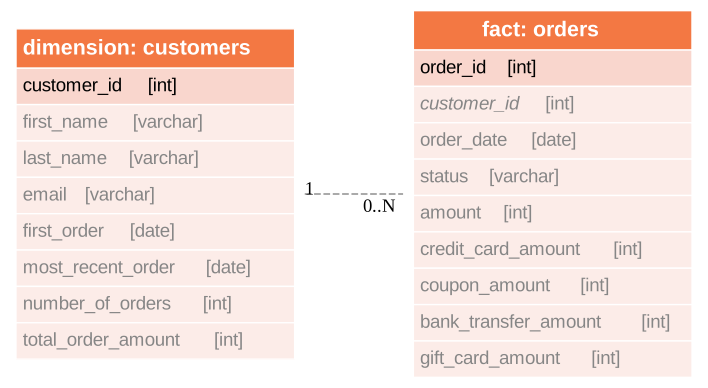
dbt takes these raw data tables and builds the following dimensional model, which is more suitable for analytics tools:
Run dbt
Create raw data tables
In production, raw data is typically ingested from platforms like Segment, Stitch, Fivetran, or another ETL/ELT tool. In this tutorial, we use dbt's seed functionality to create tables from CSV files. The CSV files are located in the ./data directory. Each CSV file produces one table, and dbt infers the column data types from the file contents.
You should now see three tables in your jaffle_shop database: raw_customers, raw_orders, and raw_payments. The tables should be populated with data from the CSV files.
Create the dimensional model
Now that we have the raw tables, we can instruct dbt to create the dimensional model:
So what exactly happened here? dbt created additional tables using CREATE TABLE/VIEW FROM SELECT SQL. In the first transformation, dbt took raw tables and built denormalized join tables called customer_orders, order_payments, customer_payments. You will find the definitions of these tables in ./models/marts/core/intermediate.
In the second step, dbt created dim_customers and fct_orders tables. These are the dimensional model tables that we want to expose to our BI tool.
Test the data
dbt applied multiple transformations to our data. How can we ensure that the data in the dimensional model is correct? dbt allows us to define and execute tests against the data. The tests are defined in ./models/marts/core/schema.yml. The file describes each column in all relationships. Each column can have multiple tests configured under tests key. For example, we expect that fct_orders.order_id column will contain unique, non-null values. To validate that the data in the produced tables satisfies the test conditions run:
Generate documentation
Our model consists of just a few tables. Imagine a scenario where we have many more sources of data and a much more complex dimensional model. We could also have an intermediate zone between the raw data and the dimensional model that follows the Data Vault 2.0 principles. Would it not be useful, if we had the inputs, transformations and outputs documented somehow? dbt allows us to generate documentation from its configuration files:
This will produce HTML files in ./target directory.
You can start your own server to browse the documentation. The following command will start a server and open up a browser tab with the docs' landing page:
Summary
This tutorial demonstrated how to use dbt with Teradata. The sample project takes raw data and produces a dimensional data mart. We used multiple dbt commands to populate tables from CSV files (dbt seed), create models (dbt run), test the data (dbt test), and generate and serve model documentation (dbt docs generate, dbt docs serve).